[Postgres] 資料庫的索引(Index)

前言


上一篇記錄了資料庫儲存資料的概念與其儲存結構,本文將初步探討資料庫裡的 索引(Index) ,了解 Index 的作用、行為以及實際操作方式。

本篇主要筆記 Udemy - SQL and PostgreSQL: The Complete Developer’s Guide 及 Udemy - Fundamentals of Database Engineering 的課程內容,但以自己較易理解的方式加以整理,可能和原課程內容有些出入。

資料庫未使用 Index 的情況下,會採讀取整張表的方式來找出目標資料,這種搜尋方式作 Full Table Scan。

Full Table Scan

Full Table Scan 中文翻作全表掃描,又作 Sequential Scan,按順序讀取整張資料表,搜尋效率最差,過程中涉及多次 I/O 讀取 Heap Table File 裡的 page。

試想一下,若要在厚厚的一本書(資料表)裡找出某個文字段落(某筆資料),在沒有目錄的幫助下,肯定是一頁一頁找,得花上不少時間,資料庫也是同等道理。

因此我們需要找方法來提升查詢效率,其中一個方式就是 Index。

什麼是 Index?

Index 就類似於一本書(資料表)的目錄,我們能根據目錄快速地找到想要的內容所在位置。

Index 一般來說都採用 B-Tree 的資料結構,也是最常見的 Index 類型,除了 B-Tree 外還有其他類型,本篇主要聚焦在 B-Tree,index 裡除了被設置為 index 欄位的值外,會有個 row pointer (指針) 指向該 row 位於 Heap Table File 的位置,讓資料庫能有效地根據 pointer 參照的位置取得資料,藉此改善查詢效率。

透過 Index 查詢的流程如下圖所示:
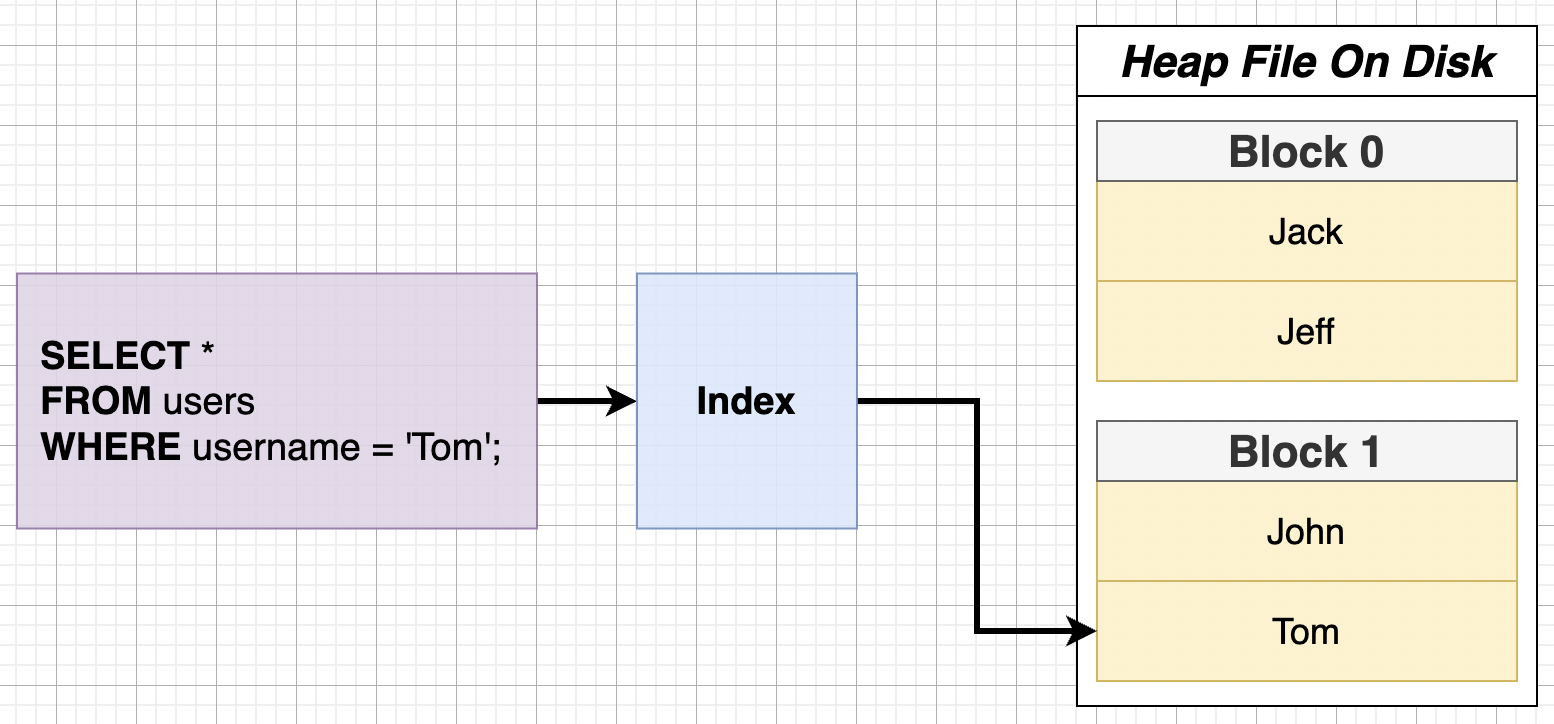
執行 SQL SELECT 時查找使用者名為 Tom 的資訊,若 Index 裡找出 Tom 這個人,取得 Tom 在 Heap Table File 的位置為 Block 1,資料庫會直接到 Heap File 的 Block 1 裡取出 Tom 的資料,而非從第一個 block 開始搜尋,過程中會經歷兩次 I/O (兩次 I/O 的過程可以參考前一篇討論)。

什麼是 B-Tree?

B-Tree 是一種常用於外部存儲的資料結構,適用於讀&寫資料區塊相對大的儲存系統,結構為 m-way 的自平衡搜尋樹,B 即 Balance 的意思,存放 有序 的資料,樹的節點 (node) 裡有儲存鍵值對(key-value pair)的元素(element),分別存 index 的位置與該筆資料於 Heap File 的位置,父層節點會透過 pointer 指向子節點 。

常見應用:資料庫、文件系統
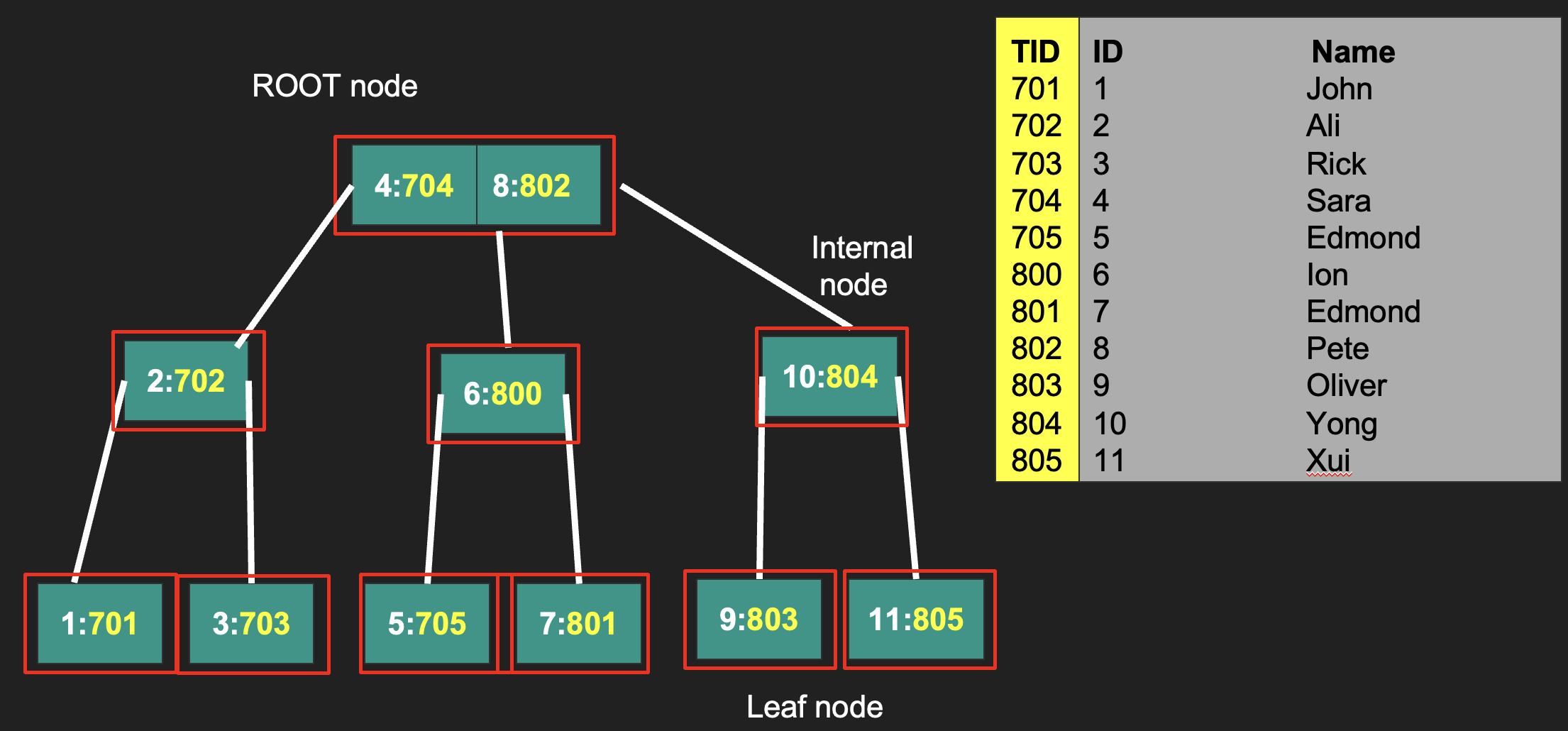
B-Tree

幾個重要名詞:
Degree: 分支度,一個 node 擁有子樹的個數
Root Node: 樹的最上層
Internal Node: 至少有一個子節點
Leaf Node: 沒有子樹

B-Tree 幾項重要特性

  • 根節點 (Root Node) 至少有兩個子節點(Child Node)
  • 可以為空
  • 所有的 Leaf Node 都在同一階層
  • 除了 Root Node、Leaf Node 外,其他節點至少會有個子節點,最多有 m 個
  • 同個節點裡的 key 是升冪排列
  • B-Tree的高度: 不包含 Leaf Node 的階層數
  • B-Tree的高度和磁碟存取時的 I/O 次數有正相關,影響走訪(traversal)整棵樹的時間複雜度

B-tree 是如何幫助資料庫搜尋?

設置 index 時,會指定哪個欄位作為 index 的資料,資料庫會將 Heap Table File 裡該欄位的值及對應的位置。

下圖以 user name 作為 index 的範例:
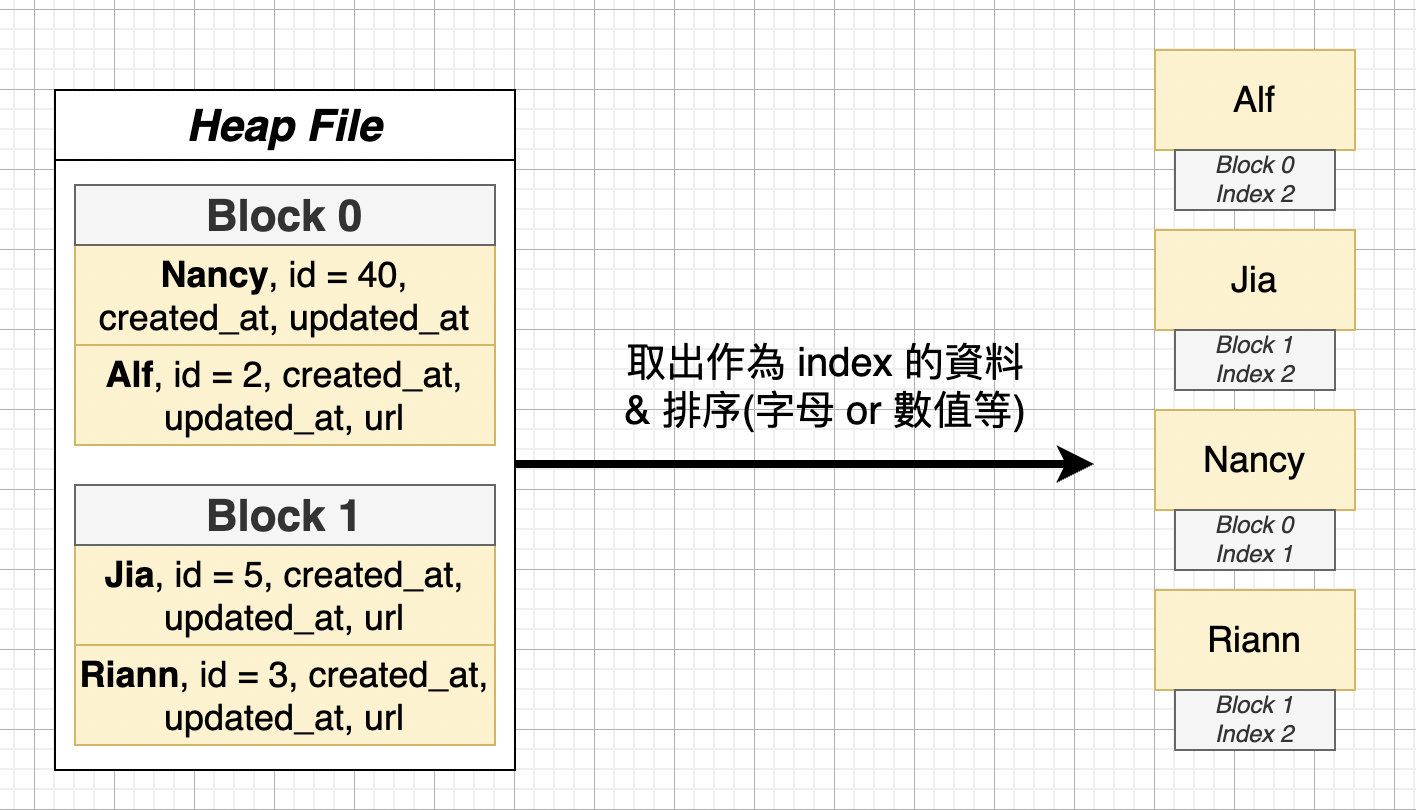
index 的內容包含了 user name (e.g. Alf)、該筆資料於 heap file 的位置(e.g. block 0),並以字母為依據進行排序,排序好 index 值後會被放入樹狀的資料結構裡,樹的葉節點存放一個個鍵值(key-value)的元素,而 root node 會定義好一些規則判別要到哪個葉節點取資料。
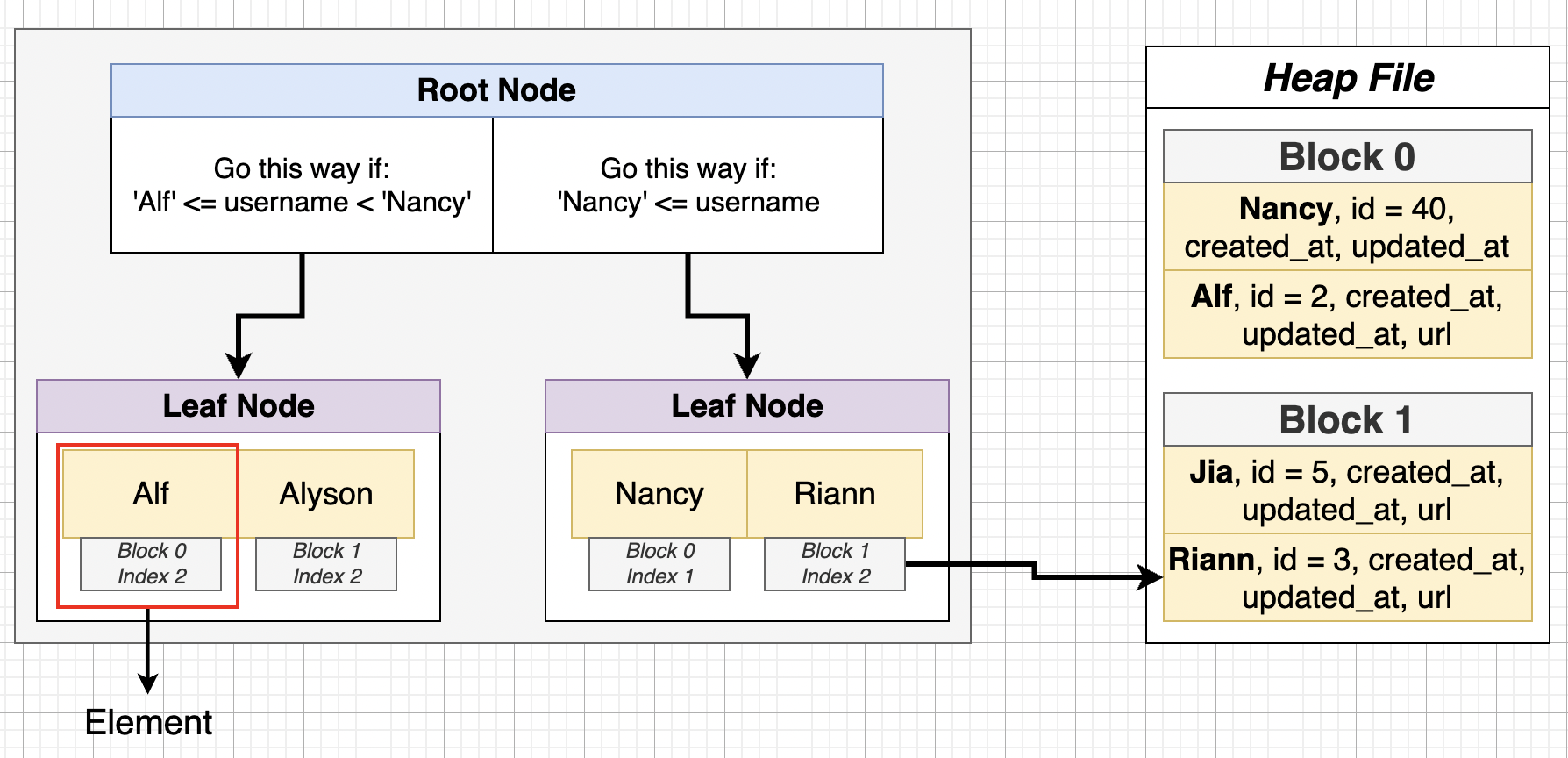

上圖範例是找出 Riann 這個 user name,資料庫進行 index 搜尋時找出右方葉節點裡的 Riann,並藉由 pointer 得知 Riann 位於 Heap File 的 block 1,就直接從 block 1 裡找資料,而不會從 block 0 開始找,加快搜尋的時間。

Index 存放於 Disk & Memory 的示意圖
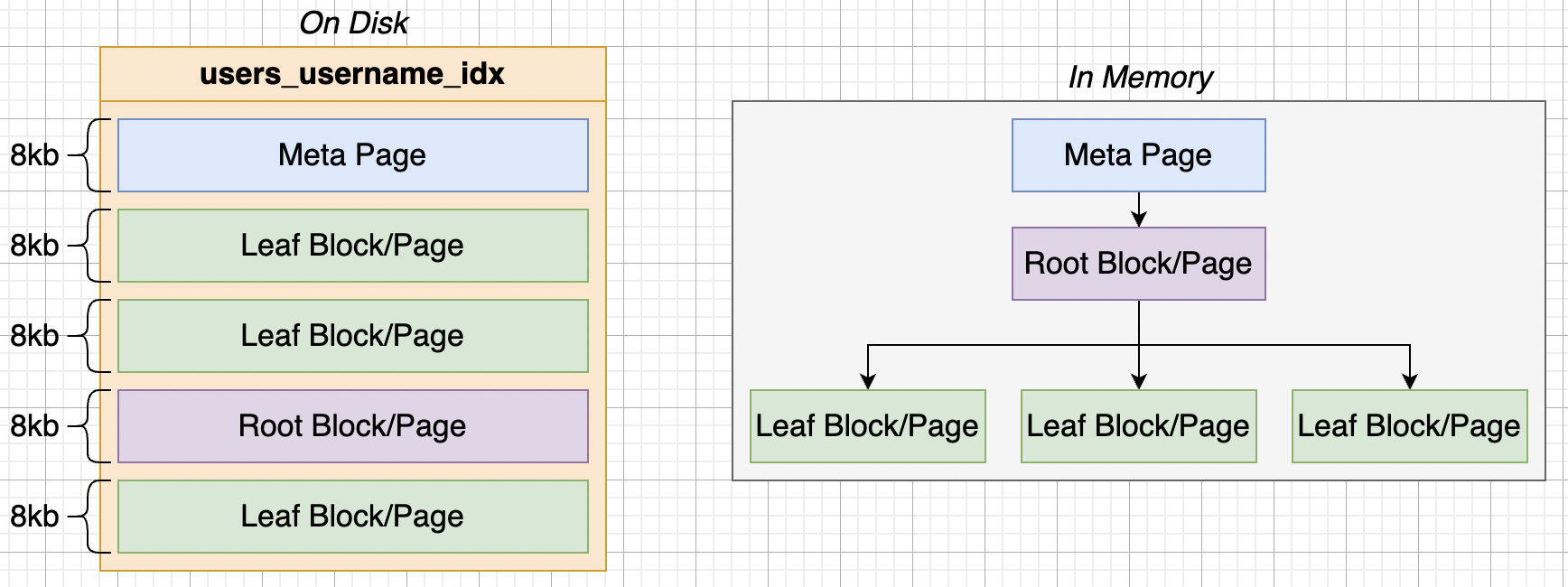

Disk 裡 Index 會包含 Heap File 的 meta data、根節點、葉節點的資料等

Clustered Index v.s. Non-clustered Index

Clustered Index 是根據資料在儲存空間上的排序而建立,而 Non-clustered Index 不一定要按照實體資料的排序而建立。

Clustered Index

中文作 叢集索引 ,概念類似書(比喻作資料表)的目錄,用於快速查找書的內容,而每本書會有一個目錄,所以每張資料表只會有一個 Clustered index。

事實上,Clustered Index 的機制在不同的關連式資料庫有不同的實作方式,如: SQL Server裡預設會將 Primary Key (主鍵) 作為 Clustered Index。

以下引用自 MS SQL server 文件:

CLUSTERED | NONCLUSTERED
Indicate that a clustered or a nonclustered index is created for the PRIMARY KEY or UNIQUE constraint. PRIMARY KEY constraints default to CLUSTERED, and UNIQUE constraints default to NONCLUSTERED.

而 Clustered Index 在 PostgreSQL 裡有別於 SQL server,需透過 CLUSTER 的指令來完成 Clustered Index。

具體實現機制參考 Stack Overflow - About clustered index in postgres相關討論。

Non-clustered Index

中文作 非叢集索引,概念類似書(比喻作資料表)的附錄,每本書可以有多個附錄,每張資料表能有多個 Non-clustered Index。

比較有無 index 差異

先建立 1 百萬筆測試資料

1
2
3
4
5
6
7
8
9
10
11
12
13
14
15
16
17
18
19
20
21
create table employees( id serial primary key, name text);

create or replace function random_string(length integer) returns text as
$$
declare
chars text[] := '{0,1,2,3,4,5,6,7,8,9,A,B,C,D,E,F,G,H,I,J,K,L,M,N,O,P,Q,R,S,T,U,V,W,X,Y,Z,a,b,c,d,e,f,g,h,i,j,k,l,m,n,o,p,q,r,s,t,u,v,w,x,y,z}';
result text := '';
i integer := 0;
length2 integer := (select trunc(random() * length + 1));
begin
if length2 < 0 then
raise exception 'Given length cannot be less than 0';
end if;
for i in 1..length2 loop
result := result || chars[1+random()*(array_length(chars, 1)-1)];
end loop;
return result;
end;
$$ language plpgsql;

insert into employees(name)(select random_string(10) from generate_series(0, 1000000));

查看資料表

1
2
3
4
5
6
7
8
postgres-# \d employees;
Table "public.employees"
Column | Type | Collation | Nullable | Default
--------+---------+-----------+----------+---------------------------------------
id | integer | | not null | nextval('employees_id_seq'::regclass)
name | text | | |
Indexes:
"employees_pkey" PRIMARY KEY, btree (id)

注意:
PostgreSQL 裡,每個 primary key 預設都會另外建一個 btree 類型的 index

查詢 employees 表裡的 id = 2000 的 id 值, 並透過查詢計劃 explain analyze 語句來分析查詢效能

1
explain analyze SELECT id FROM employees WHERE id = 2000;

查詢結果

1
2
3
4
5
6
7
8
QUERY PLAN
-------------------------------------------------------------------------------------------------------------------------------
Index Only Scan using employees_pkey on employees (cost=0.42..4.44 rows=1 width=4) (actual time=0.058..0.062 rows=1 loops=1)
Index Cond: (id = 2000)
Heap Fetches: 0
Planning Time: 0.201 ms
Execution Time: 0.113 ms
(5 rows)

結果裡可以看到有命中預設的 index,查詢速度變非常快。

Heap Fetches: 0 :不需要存取 Heap Table File 的資料,直接存取 index 就可以拿到資料,因為查詢語句指定的欄位只有 id 而已,而 id 在 Postgres 裡有預設建立好的 index,故不需從 Heap Table File 找對應的值。

Postgres 預設會在每張表的主鍵(Primary Key)或被設唯一限制(UNIQUE Constraint)的欄位自動建立 index 。

Source: PostgreSQL Docs

PostgreSQL automatically creates a unique index when a unique constraint or primary key is defined for a table. The index covers the columns that make up the primary key or unique constraint (a multicolumn index, if appropriate), and is the mechanism that enforces the constraint.

把 select 出來的欄位改成非預設建立 index 欄位 - name :

1
2
3
4
5
6
7
8
postgres=# explain analyze SELECT name FROM employees WHERE id = 937481;
QUERY PLAN
--------------------------------------------------------------------------------------------------------------------------
Index Scan using employees_pkey on employees (cost=0.42..8.44 rows=1 width=6) (actual time=0.219..0.225 rows=1 loops=1)
Index Cond: (id = 937481)
Planning Time: 0.323 ms
Execution Time: 0.306 ms
(4 rows)

name 欄位未被設為 index,會存放於 disk 裡的 heap table,故資料庫要先去 heap table 拿對應的資料,所以多一段花費時間。

Tips:
執行重複的查詢會發現花費時間會縮短,原因是資料庫本身的快取(Cache) 機制

若把 WHERE 條件改成 name:

1
2
3
4
5
6
7
8
9
10
11
12
postgres=# explain analyze SELECT id FROM employees WHERE name = 'Zs';
QUERY PLAN
-------------------------------------------------------------------------------------------------------------------------
Gather (cost=1000.00..11310.94 rows=6 width=6) (actual time=179.857..333.772 rows=21 loops=1)
Workers Planned: 2
Workers Launched: 2
-> Parallel Seq Scan on employees (cost=0.00..10310.34 rows=2 width=6) (actual time=14.909..147.673 rows=7 loops=3)
Filter: (name = 'Zs'::text)
Rows Removed by Filter: 333327
Planning Time: 0.944 ms
Execution Time: 334.032 ms
(8 rows)

在沒有命中 index 的查詢下,Postgres Planner 會採 Seq Scan (Sequential Scan) 的方式搜尋整張資料表(full table scan),花費時間為 334.032 ms ,較先前查詢費時許多,從結果可觀察到有沒有命中 index 在資料量大的狀況下會顯著地影響查詢效能。

建立 Index 的缺點

雖然 index 有助於提升搜尋效能,但也有其缺點,如:Index 會佔用資料庫的空間,是以空間來換取時間,且每次在表中新增、修改或刪除時,都必須更動該表上的所有 Index,Index 建越多,資料庫需要執行的工作就越多,花額外成本來維護 Index,最終導致效能降低,應謹慎評估使用 Index。

Index 雖有助於提高 查詢(SELECT) 速度,但會降低 寫入(INSERT) 以及 更新(UPDATE) 資料的速度 → 因為同時要更動 Index

思考是否真的需要建 Index 的情況

  • 資料量較小的表
  • 該欄位頻繁且大量被更新或新增
  • 避免使用包含太多 NULL 值的欄位

評估 Index Hit Rate

執行下方的 SQL 語句可以查看 Index 命中的比率,藉此評估建好的 Index 是不是在查詢時被有效命中

1
2
3
4
5
6
7
8
9
10
11
select
t.schemaname,
t.relname as "Table Name",
io_i.indexrelname as "Index Name",
case when (io_i.idx_blks_hit <> 0 or io_i.idx_blks_read <> 0) then
round(io_i.idx_blks_hit/(io_i.idx_blks_hit::numeric +
io_i.idx_blks_read::numeric), 4) else null end as "Index Hit Ratio"
from
pg_stat_user_tables t
join pg_statio_user_indexes io_i on io_i.relid = t.relid
order by "Index Hit Ratio" desc;

建立 index

語法:

1
create index <index_name> on <table>(<column>);

範例:

替 employees 表裡的 name 欄位建 index

1
create index employees_name on employees(name);

再執行一次 name 的查詢

1
2
3
4
5
6
7
8
9
10
11
postgres=# explain analyze SELECT id,name FROM employees WHERE name = 'Zs';
QUERY PLAN
------------------------------------------------------------------------------------------------------------------------
Bitmap Heap Scan on employees (cost=4.47..27.93 rows=6 width=10) (actual time=0.930..1.211 rows=21 loops=1)
Recheck Cond: (name = 'Zs'::text)
Heap Blocks: exact=21
-> Bitmap Index Scan on employees_name (cost=0.00..4.47 rows=6 width=0) (actual time=0.859..0.861 rows=21 loops=1)
Index Cond: (name = 'Zs'::text)
Planning Time: 3.024 ms
Execution Time: 1.299 ms
(7 rows)

命中 index 的情況下,執行時間下修到只剩 1.299 ms。

雖說有對 name 欄位下了 index,但特定情況下仍可能無法發揮作用。
例如: 將剛剛 WHERE = 的條件改為 LIKE

1
2
3
4
5
6
7
8
9
10
11
12
postgres=# explain analyze SELECT id,name FROM employees WHERE name LIKE '%ZA%';
QUERY PLAN
----------------------------------------------------------------------------------------------------------------------------
Gather (cost=1000.00..11319.34 rows=90 width=10) (actual time=1.113..132.030 rows=1215 loops=1)
Workers Planned: 2
Workers Launched: 2
-> Parallel Seq Scan on employees (cost=0.00..10310.34 rows=38 width=10) (actual time=0.340..114.713 rows=405 loops=3)
Filter: (name ~~ '%ZA%'::text)
Rows Removed by Filter: 332929
Planning Time: 2.710 ms
Execution Time: 132.185 ms
(8 rows)

從結果觀察到同樣以 name 作為搜尋條件,卻出現沒有命中 index 的情形,選擇用 Seq Scan (Sequential Scan)的方式掃描整張表,由此可知並非只要加上 index,資料庫的 Planner 就會在每次搜尋時選擇 index。

Index Scan v.s. Index Only Scan

Index Only Scan 與 Index Scan 兩者主要差異在於:

Index Only Scan 的資料是直接來自於 index,不需要再到 Heap File 取得資料,一般來說讀取的速度較 Index Scan 更快。

1
2
3
4
5
6
7
8
9
10
11
12
13
14
15
16
17
-- 建表
create table grades (
id serial primary key,
g int,
name text
);

-- 寫入測試資料
insert into grades (g,
name )
select
random()*100,
substring(md5(random()::text ),0,floor(random()*31)::int)
from generate_series(0, 500);

-- 建 index
CREATE INDEX id_idx ON grades(id);

分別測試 SELECT 不同欄位的結果:

查詢 id

1
2
3
4
5
6
7
8
9
postgres=# explain analyze select id from grades where id = 7;
QUERY PLAN
--------------------------------------------------------------------------------------------------------------------
Index Only Scan using id_idx on grades (cost=0.27..8.29 rows=1 width=4) (actual time=0.073..0.078 rows=1 loops=1)
Index Cond: (id = 7)
Heap Fetches: 1
Planning Time: 0.249 ms
Execution Time: 0.130 ms
(5 rows)

查詢 name

1
2
3
4
5
6
7
8
postgres=# explain analyze select name from grades where id = 7;
QUERY PLAN
----------------------------------------------------------------------------------------------------------------
Index Scan using id_idx on grades (cost=0.27..8.29 rows=1 width=15) (actual time=0.060..0.064 rows=1 loops=1)
Index Cond: (id = 7)
Planning Time: 0.360 ms
Execution Time: 0.219 ms
(4 rows)

比較上方兩條 query,經由 explain 分析的結果,下方的 query 查詢的 name 欄位需到 Heap Table File 裡讀取 name 對應的資料。

相較之下查詢 id 的 query 因為 id 本身已被設定為 index,故資料庫在讀取 index 時,會一起將命中的 index 值一並取出並回傳。

Includes Index

如果希望把其他欄位的值也存在 index 上,可以採用 include 的 SQL 語句結合 index 將其他欄位納入 index。

範例:
先移除原先建立好的 index

1
DROP index id_idx;

將 name 欄位納入 index

1
create index id_idx on grades(id) include (name)

查看建好 index 後的結果

1
2
3
4
5
6
7
8
9
10
postgres=# \d grades;
Table "public.grades"
Column | Type | Collation | Nullable | Default
--------+---------+-----------+----------+------------------------------------
id | integer | | not null | nextval('grades_id_seq'::regclass)
g | integer | | |
name | text | | |
Indexes:
"grades_pkey" PRIMARY KEY, btree (id)
"id_idx" btree (id) INCLUDE (name)

接著對 SELECT 語句進行分析

1
2
3
4
5
6
7
8
9
postgres=# explain analyze select name from grades where id = 7;
QUERY PLAN
---------------------------------------------------------------------------------------------------------------------
Index Only Scan using id_idx on grades (cost=0.27..8.29 rows=1 width=15) (actual time=0.097..0.103 rows=1 loops=1)
Index Cond: (id = 7)
Heap Fetches: 1
Planning Time: 1.745 ms
Execution Time: 0.182 ms
(5 rows)

加了 include 之後,explain 分析的結果從 Index Scan → Index Only Scan,代表查詢連同後來納入的 name 值直接從 Index 裡面取出,沒有額外到 Heap Table File 裡取值。

NOTE:

  • include 會把其他指定的欄位納入 Index,適合把 include 指定的欄位用在 Index Only Scan 的策略上。
  • 重要:include 的欄位並 不作為 Index 的 search key!故把上面的查詢條件 where 改為 name 時,資料庫就不會在 Index 裡搜尋到 name 值。
  • 會增加 Index 的大小,隨著 Index 的增長,查詢 index 的速度會變慢,故在使用上要評估實際使用的場景以及取捨,再決定是否要採用。

將剛剛 include 的 name 欄位作為 where 條件:

1
2
3
4
5
6
7
8
9
postgres=# explain analyze select name from grades where name = 'Zs';
QUERY PLAN
--------------------------------------------------------------------------------------------------
Seq Scan on grades (cost=0.00..10.26 rows=1 width=15) (actual time=0.661..0.663 rows=0 loops=1)
Filter: (name = 'Zs'::text)
Rows Removed by Filter: 501
Planning Time: 0.365 ms
Execution Time: 0.733 ms
(5 rows)

從上述分析結果得知,雖然 name 透過 include 被納入 id_idx,但 id_idx 的 search key 是 id 欄位非 name,資料庫採用 Seq Scan 的方式。

分析 index 使用的情況

透過以下的 SQL query 可以查詢到 index 的使用情形

1
SELECT * FROM pg_stat_user_indexes;

查詢結果

1
2
3
4
5
6
relid  | indexrelid | schemaname |  relname  | indexrelname   | idx_scan | idx_tup_read | idx_tup_fetch
-------+------------+------------+------------+-------------------------+----------+--------------+---------------
39249 | 39256 | public | employees | employees_pkey | 36 | 2000035 | 2000032
39249 | 39259 | public | employees | employees_name | 2 | 21 | 0
39262 | 39269 | public | grades | grades_pkey | 0 | 0 | 0
39262 | 39272 | public | grades | id_idx | 17 | 17 | 17

查看指定的 index 大小

語法:
<index_name> 替換成指定的 index 名稱

1
SELECT pg_size_pretty(pg_relation_size('<index_name>'));

範例: 查看 grades 這張表的 index: id_idx

1
2
3
4
5
postgres=# SELECT pg_size_pretty(pg_relation_size('id_idx'));
pg_size_pretty
----------------
40 kB
(1 row)

延伸探討

為什麼 Postgres 有時不選擇 Index Scan 卻選擇 Sequential Scan?

有時候 PostgreSQL 在查詢時會選擇用 Sequential Scan 的方式,不採用下好的 Index 做 Index Scan,主要有幾個原因:

資料類型不匹配

有些強制型別轉換會導致 Index 未被使用的情形,我們拿前面的 SQL 範例做調整,把搜尋條件 id 加上型別轉換(cast) ::numeric 的語句,改成下方的樣子:

1
explain analyze select id from grades where id = 7::numeric;

型別轉換阻止 Postgres 使用建立好的 Index,藉由 explain analyze 分析產生以下結果:

1
2
3
4
5
6
7
8
9
postgres=# explain analyze select id from grades where id = 7::numeric;
QUERY PLAN
-------------------------------------------------------------------------------------------------
Seq Scan on grades (cost=0.00..11.52 rows=3 width=4) (actual time=0.086..0.840 rows=1 loops=1)
Filter: ((id)::numeric = '7'::numeric)
Rows Removed by Filter: 500
Planning Time: 0.372 ms
Execution Time: 0.899 ms
(5 rows)

從結果可看出 Postgres Planner 選擇 Seq Scan 而非前面的 Index Only Scan using id_idx on grades

評估結果是Sequential Scan 更快

在資料量很小時,Sequential Scan 會比 Index Scan 更加有效,原因是 Index Scan 至少要發生兩次 I/O,一次是讀取 Index 的資料,一次是讀取 Heap File 裡的資料,搜尋代價遠高於 Index Scan。

總結

前面談到有設置且命中 Index 在資料量大的情況下,對查詢效率會有顯著的差異。

使用 Index 前也須考量使用情境與其缺點,而且並非只要建立好 Index,SQL 查詢就一定會命中 Index,這些都是使用上要注意的地方。

善用 PostgresSQL Planner 的提示有助於評估當前 SQL 運行的狀況,衡量如何使用 Index。

參考

Comments